
Verification
After 2-Step Verification, complete the sliding puzzle-piece CAPTCHA. Perfect Circle follows that check.
The first ten currently documented methods are Roblox OAuth, Google Offline, Electronic Post, Slider, PIN, Match, Face ID, Coin Flip, Pattern, and 2-Step Verification. Complete them in that order; each success unlocks the next method. This sequence is cross-checked against August 2026 gameplay and a public written walkthrough, but a future game update could change it.
This is the opening order observed in reviewed August 2026 gameplay and documented by a written walkthrough checked on August 29, 2026. It is not a promise that the developer will keep the same order after future updates; follow the screen in front of you if your run differs.
| No. | Login method | How to clear it |
|---|---|---|
| 1 | Roblox OAuth | Choose Continue, review the requested access, then select Confirm and Give Access. |
| 2 | Google Offline | Use Space to jump and duck when needed until the dinosaur run reaches the displayed reconnect target, then reload. |
| 3 | Electronic Post | Enter the requested username on the Google-style sign-in screen and continue. |
| 4 | Slider | Hold the round handle and drag it fully right until the panel reaches 100% and reports success. |
| 5 | PIN | Enter the four-digit PIN requested by the phone-style screen and submit it. |
| 6 | Match | Review every profile card with the on-screen left and right controls until the audit completes. |
| 7 | Face ID | Drag the Roblox avatar into the face frame and hold it there until the screen says the face is recognized. |
| 8 | Coin Flip | Use the coin control on the simulated search page and complete the displayed flip. |
| 9 | Pattern | Trace the smudged path across the 3×3 grid in the same order shown on your screen. |
| 10 | 2-Step Verification | Request a code, read the newest Google message in Electronic Post, and enter that session's six digits. |
After 2-Step Verification, complete the sliding puzzle-piece CAPTCHA. Perfect Circle follows that check.
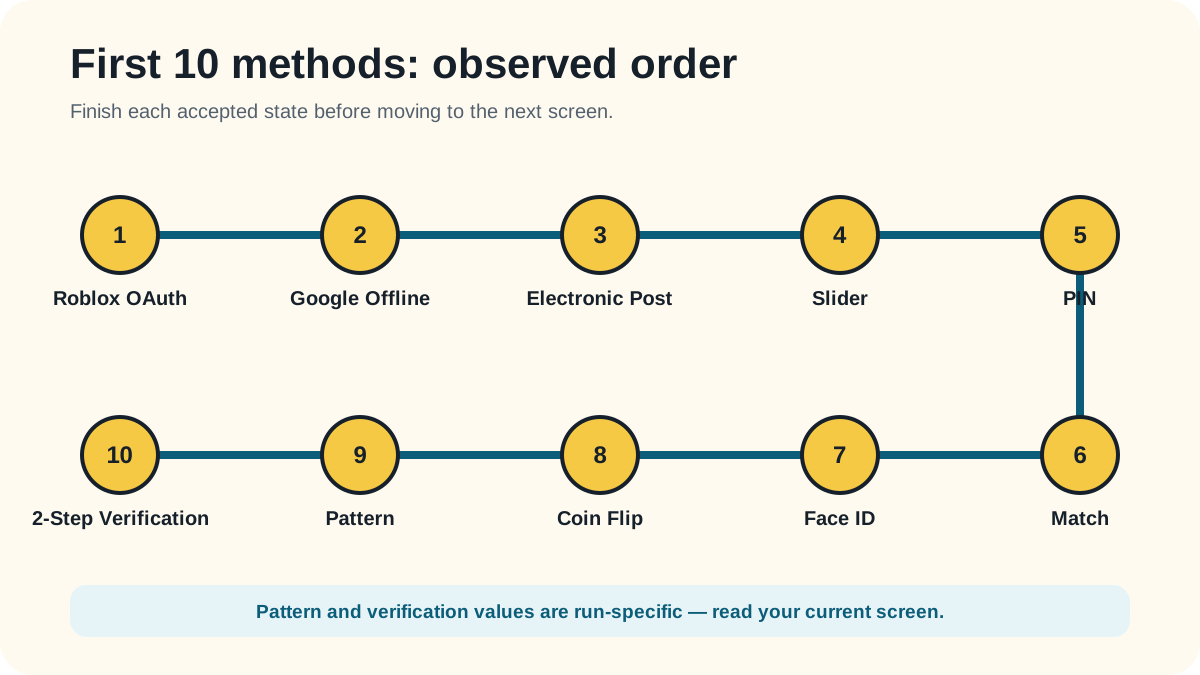
Clear each screen and wait for its accepted or completed state before continuing. The opening run mixes confirmation screens, a short runner, simple inputs, and values that must be read from your own session.
The current 2-Step Verification code is accepted and the game records the tenth completion. Ten-Factor Authentication is the matching official milestone, and Verification becomes the next method.
Retry the method itself first. These failure checks stay within what the reviewed gameplay can support.
You leave a method before its accepted, completed, or progress-saved state appears.
You copy a Pattern or verification code from a guide instead of using the value shown in your run.
You click the Slider track once instead of holding the handle and dragging it to the far-right end.
You use Skip, so the method is not completed through the documented no-Skip route.
Reviewed 2026-08-23 · action 00:00:01–00:01:36
The no-Skip run shows the opening sequence from Roblox authorization through the accepted 2-Step Verification code; Match is visibly recorded as level 6.
Reviewed 2026-08-29 · Early login methods and how to clear them
The published early-method table lists the same ten methods in the same order.
Reviewed 2026-08-29 · Experience description
The creator-owned description confirms that clearing each method unlocks the next; it does not itself publish the full ten-method order.
Source footage was reviewed locally and is not republished here. Skip was not used. Game version was not displayed. An independent replay test is still pending.
Reviewed by: TheLoginGame.wiki Editorial Team
Frame-by-frame gameplay review showing the prompt, player action, and explicit success state. No Skip was used as evidence.
See something different in the current game? Report a correction with the page URL, game version when known, and creator-owned evidence.
Anonymous feedback helps prioritize which verified guide needs another replay check.
No permanent developer guarantee was found. The sequence matches the reviewed August 2026 gameplay and written walkthrough, but the developer could change it in a later update.
2-Step Verification is number 10 in the documented opening sequence. Request the code and read the newest Google message in the game's Electronic Post inbox.
Verification comes next: complete the sliding puzzle-piece CAPTCHA. Perfect Circle follows after that check.